How Can We Help?
-
-
- How to Access cPanel Web Disk?
- How to add a MX Record in cPanel using DNS Zone Editor?
- How to add A Record in cPanel using DNS Zone Editor?
- How to add a user to a database and add privileges?
- How to add CNAME Record in cPanel using the DNS Zone Editor?
- How to Change cPanel Style/Theme?
- How to Change Language of your cPanel?
- How to change PHP version on your domain using cPanel?
- How to check disk usage of directory and bandwidth usage?
- How to create a database in cPanel?
- How to Create a Database Username in cPanel?
- How to create a new folder or files in the cPanel File Manager?
- How to Create an Additional Web Disk Account in cPanel?
- How to create Cron job via cPanel?
- How to delete a database in cPanel?
- How to delete database table via phpMyAdmin in cPanel?
- How to Edit .htaccess File via the cPanel File manager?
- How to edit database table via phpMyAdmin in cPanel?
- How to Edit file in the cPanel File Manager?
- How to Edit or Delete Cron job via cPanel?
- How to edit or remove a Record in cPanel using the DNS Zone Editor?
- How to edit or remove CNAME Record in cPanel using the DNS Zone Editor?
- How to edit or remove MX Record in cPanel using the DNS Zone Editor?
- How to export database table via phpMyAdmin in cPanel?
- How to import database via phpMyAdmin in cPanel?
- How to optimize database via phpMyAdmin in cPanel?
- How to rename a database in cPanel?
- How to Repair database via phpMyAdmin in cPanel?
- How to Reset my cPanel Account Password?
- How to Reset my cPanel Account Password?
- How to Reset the PHP Version to the Default Version, Using cPanel?
- How to Set the PHP Version per Domain, Using cPanel?
- How to Set the PHP Version per Folder?
- How to Update a Cron job E-mail Address?
- How to update your cPanel Contact Information or receive a notification on reaching quota limit?
- How to upload files via the cPanel File Manager?
- Show all articles ( 21 ) Collapse Articles
-
- How to Create a Subdomain in cPanel?
- How to Create Addon Domains?
- How to Park a Domain in cPanel?
- How to Redirect an Add-on Domain?
- How to Redirect subdomain to an external url?
- How to Redirect your website to any page or external domain?
- How to Remove a Subdomain in cPanel?
- How to Remove an Add-on Domain?
- How to Remove Domain Redirect in cPanel?
- How to Remove Parked Domain name in cPanel?
-
- How to Access your Email Account from cPanel Webmail?
- How to change the password of your email account?
- How to check for new email in Mozilla Thunderbird?
- How to create an E-mail Autoresponder when you are unavailable or on vacation?
- How to Create Email Account in cPanel?
- How to delete email message in Mozilla Thunderbird?
- How to forward email in Mozilla Thunderbird?
- How to forward email to Gmail, Yahoo or other e-mail service providers?
- How to reply to email in Mozilla Thunderbird?
- How to send email using Mozilla Thunderbird?
- How to Setup a cPanel Email account with Mozilla Thunderbird?
-
- How to Access or Connect to Your FTP Account via the FileZilla FTP?
- How to change the FTP User Quota in cPanel?
- How to change the password of the FTP Account in cPanel?
- How to create an FTP Account in cPanel?
- How to Create or Delete a Directory Using the FileZilla FTP Client?
- How to Delete an FTP User account from cPanel?
- How to download files and folders to your computer using FileZilla?
- How to Install the FTP Client Filezilla on Windows?
- How to upload Index file to your site using FileZilla?
-
- How to Create "User Level Email Filter" in cPanel?
- How to Create Account Level/Global Email Filter in cPanel to Fight Spam?
- How to Delete "User Level Email Filter" in cPanel?
- How to Delete Account Level/Global Email Filter in cPanel?
- How to Edit "User Level Email Filter" in cPanel?
- How to Edit Account Level/Global Email Filter in cPanel?
- How to enable Apache SpamAssassin in cPanel?
- How to enable boxtrapper in cPanel?
-
- How to ban any IP Address via .htaccess?
- How to blacklist an IP Address to deny it access to your website?
- How to disable directory browsing using .htaccess?
- How to Disable the Two-Factor Authentication on Your cPanel Account?
- How to Enable or Disable Mod Security in cPanel?
- How to Enable the Two-Factor Authentication on Your cPanel Account?
- How to protect a folder with username and password in cPanel?
- How to protect your .htaccess file?
- How to protect your website's images from an external website?
- How to restrict directory access by IP address?
-
- How to access the Wordpress admin account?
- How to add a new category in WordPress?
- How to Change the Display Name of a WordPress User Account?
- How to Change the Password of a Wordpress Account?
- How to Deactivate and Delete a Plugin in WordPress?
- How to Delete/Remove a WordPress theme from the WordPress Dashboard?
- How to Forcefully Update a Plugin in WordPress?
- How to Install a New Theme in WordPress?
- How to Install a Plugin in WordPress?
- How to Manually Install a Plugin in WordPress?
- How to Manually Install a Theme on WordPress Using the Admin Dashboard?
- How to remove a category in WordPress?
- How to remove multiple posts with a single click in WordPress?
- How to remove sample comments, posts on a new WordPress blog?
- How to remove the Uncategorized category from WordPress?
- How to remove your post in Wordpress?
- How to start writing your first blog post in WordPress?
- Show all articles ( 2 ) Collapse Articles
-
-
-
- Articles coming soon
-
- How to Access your Email Account from DirectAdmin?
- How to add sub-domain in DirectAdmin?
- How to block a spammy domain using Spam Filters in DirectAdmin?
- How to block email using Spam Filters in DirectAdmin?
- How to block emails by size using Spam filter in DirectAdmin?
- How to block emails containing the Stop word in DirectAdmin?
- How to change a database user password in DirectAdmin?
- How to change the email sending limit in DirectAdmin?
- How to change the password of the FTP Account in DirectAdmin?
- How to change the password of your email account in DirectAdmin?
- How to change your email account quota in DirectAdmin?
- How to create a database in DirectAdmin?
- How to create a domain pointer in DirectAdmin?
- How to create a new database user in DirectAdmin?
- How to create an FTP Account in DirectAdmin?
- How to create domain Alias in DirectAdmin?
- How to Create Email Account in DirectAdmin?
- How to delete your database in DirectAdmin?
- How to disable Apache SpamAssassin in DirectAdmin?
- How to Download a Backup of Your Email, FTP or Database Only through DirectAdmin?
- How to download your database from DirectAdmin?
- How to enable Apache SpamAssassin in DirectAdmin?
- How to examine or optimize a database in DirectAdmin?
- How to generate and download a full backup of your DirectAdmin Account?
- How to modify database user privileges in DirectAdmin?
- How to redirect your website in DirectAdmin?
- How to Remove a Backup File from Your DirectAdmin?
- How to remove alias domain in DirectAdmin?
- How to Remove an FTP User account from DirectAdmin?
- How to remove domain pointer in DirectAdmin?
- How to remove email spam filters from DirectAdmin?
- How to remove redirect from your website in DirectAdmin?
- How to remove sub-domain in DirectAdmin?
- How to rename your email address in DirectAdmin?
- How to repair a database in DirectAdmin?
- How to Restore a Backup you Generated Earlier in DirectAdmin?
- How to suspend your FTP Account in DirectAdmin?
- Show all articles ( 22 ) Collapse Articles
-
- Change Language of your SiteWorx Account?
- How to Access AWStats in SiteWorx?
- How to Access Webalizer in SiteWorx?
- How to Access your Email Account from SiteWorx Webmail?
- How to Add a Secondary Domains to SiteWorx?
- How to ban any IP Address via .htaccess?
- How to change the password of your FTP Account in SiteWorx?
- How to change your e-mail password at SiteWorx?
- How to Create a Subdomain in SiteWorx?
- How to create a user-friendly URL using .htaccess?
- How to Create an E-mail Account with Siteworx?
- How to create an E-mail Autoresponder when you are unavailable or on vacation in SiteWorx?
- How to Delete an FTP account in SiteWorx?
- How to disable directory browsing using .htaccess?
- How to Edit file in the SiteWorx File Manager?
- How to forward email to Gmail, Yahoo or other e-mail service providers?
- How to generate a full backup of your SiteWorx Account?
- How to Install Advanced Electron Forum(AEF) via Softaculous in SiteWorx?
- How to Install b2evolution via Softaculous in SiteWorx?
- How to Install bbPress Forum via Softaculous in SiteWorx?
- How to Install Beehive Forum via Softaculous in SiteWorx?
- How to Install Chyrp via Softaculous in SiteWorx?
- How to Install Dotclear via Softaculous in SiteWorx?
- How to Install Drupal via Softaculous in SiteWorx?
- How to Install eggBlog via Softaculous in SiteWorx?
- How to Install FlatPress via Softaculous in SiteWorx?
- How to Install FluxBB Forum via Softaculous in SiteWorx?
- How to Install FUDforum Forum via Softaculous in SiteWorx?
- How to Install Ghost via Softaculous in SiteWorx?
- How to Install Joomla via Softaculous in SiteWorx?
- How to Install LifeType via Softaculous in SiteWorx?
- How to Install miniBB Forum via Softaculous in SiteWorx?
- How to Install MyBB Forum via Softaculous in SiteWorx?
- How to Install Nibbleblog via Softaculous in SiteWorx?
- How to Install Nucleus via Softaculous in SiteWorx?
- How to Install OpenBlog via Softaculous in SiteWorx?
- How to Install Phorum Forum via Softaculous in SiteWorx?
- How to Install phpBB Forum via Softaculous in SiteWorx?
- How to Install PivotX via Softaculous in SiteWorx?
- How to Install Pixie via Softaculous in SiteWorx?
- How to Install PunBB Forum via Softaculous in SiteWorx?
- How to Install Serendipity via Softaculous in SiteWorx?
- How to Install SMF Simplemachine Forum via Softaculous in SiteWorx?
- How to Install Textpattern via Softaculous in SiteWorx?
- How to Install Vanilla Forum via Softaculous in SiteWorx?
- How to Install Wordpress via Softaculous in SiteWorx?
- How to Install XMB Forum via Softaculous in SiteWorx?
- How to protect your .htaccess file?
- How to redirect a page to another page or website using .htaccess?
- How to Remove a Subdomain in SiteWorx?
- How to Remove Email account in SiteWorx?
- How to Remove Secondary Domains on SiteWorx?
- How to Reset my InterWorx (SiteWorx) Account Password?
- How to Restore Partial backup in SiteWorx?
- How to restrict directory access by IP address?
- How to update your SiteWorx Email Address?
- How to upload files via the SiteWorx FileManager?
- PHP error: Allowed memory size of x bytes exhausted
- Show all articles ( 43 ) Collapse Articles
-
- How to Install Advanced Electron Forum(AEF) via Softaculous in cPanel?
- How to Install Anchor CMS via Softaculous in cPanel?
- How to Install b2evolution via Softaculous in cPanel?
- How to Install bbPress Forum via Softaculous in cPanel?
- How to Install Beehive Forum via Softaculous in cPanel?
- How to Install Bolt via Softaculous in cPanel?
- How to Install Chyrp via Softaculous in cPanel?
- How to Install CMS Made Simple via Softaculous in cPanel?
- How to Install Composr via Softaculous in cPanel?
- How to Install Concrete5 via Softaculous in cPanel?
- How to Install Contao via Softaculous in cPanel?
- How to Install Croogo via Softaculous in cPanel?
- How to Install Dotclear via Softaculous in cPanel?
- How to Install Drupal via Softaculous in cPanel?
- How to Install e107 via Softaculous in cPanel?
- How to Install eggBlog via Softaculous in cPanel?
- How to Install FlatPress via Softaculous in cPanel?
- How to Install FluxBB Forum via Softaculous in cPanel?
- How to Install Fork via Softaculous in cPanel?
- How to Install FUDforum Forum via Softaculous in cPanel?
- How to Install Geeklog via Softaculous in cPanel?
- How to Install Ghost via Softaculous in cPanel?
- How to Install GRAV via Softaculous in cPanel?
- How to Install HTMLy via Softaculous in cPanel?
- How to Install ImpressPages via Softaculous in cPanel?
- How to Install Jamroom via Softaculous in cPanel?
- How to Install jCore via Softaculous in cPanel?
- How to Install Joomla via Softaculous in cPanel?
- How to Install Kirby via Softaculous in cPanel?
- How to Install Kliqqi via Softaculous in cPanel?
- How to Install LifeType via Softaculous in cPanel?
- How to Install liveSite via Softaculous in cPanel?
- How to Install Mambo via Softaculous in cPanel?
- How to Install Microweber via Softaculous in cPanel?
- How to Install miniBB Forum via Softaculous in cPanel?
- How to Install MODx via Softaculous in cPanel?
- How to Install MovableType via Softaculous in cPanel?
- How to Install MyBB Forum via Softaculous in cPanel?
- How to Install Nibbleblog via Softaculous in cPanel?
- How to Install Nucleus via Softaculous in cPanel?
- How to Install ocPortal via Softaculous in cPanel?
- How to Install OctoberCMS via Softaculous in cPanel?
- How to Install Open Real Estate via Softaculous in cPanel?
- How to Install OpenBlog via Softaculous in cPanel?
- How to Install Phorum Forum via Softaculous in cPanel?
- How to Install PHP-Fusion via Softaculous in cPanel?
- How to Install PHP-Nuke via Softaculous in cPanel?
- How to Install phpBB Forum via Softaculous in cPanel?
- How to Install Pimcore via Softaculous in cPanel?
- How to Install PivotX via Softaculous in cPanel?
- How to Install Pixie via Softaculous in cPanel?
- How to Install Pluck via Softaculous in cPanel?
- How to Install PluXml via Softaculous in cPanel?
- How to Install PopojiCMS via Softaculous in cPanel?
- How to Install ProcessWire via Softaculous in cPanel?
- How to Install PunBB Forum via Softaculous in cPanel?
- How to Install PyroCMS via Softaculous in cPanel?
- How to Install Quick.CMS via Softaculous in cPanel?
- How to Install Saurus CMS via Softaculous in cPanel?
- How to Install Serendipity via Softaculous in cPanel?
- How to Install Silex via Softaculous in cPanel?
- How to Install SilverStripe via Softaculous in cPanel?
- How to Install SiteCake via Softaculous in cPanel?
- How to Install SMF Simplemachine Forum via Softaculous in cPanel?
- How to Install sNews via Softaculous in cPanel?
- How to Install Subrion via Softaculous in cPanel?
- How to Install TangoBB Forum via Softaculous in cPanel?
- How to Install Textpattern via Softaculous in cPanel?
- How to Install Typesetter via Softaculous in cPanel?
- How to Install Unclassified NewsBoard via Softaculous in cPanel?
- How to Install Vanilla Forum via Softaculous in cPanel?
- How to Install Website Baker via Softaculous in cPanel?
- How to Install WonderCMS via Softaculous in cPanel?
- How to Install Wordpress via Softaculous in cPanel?
- How to Install XMB Forum via Softaculous in cPanel?
- How to Install Xoops via Softaculous in cPanel?
- How to Install Zikula via Softaculous in cPanel?
- Show all articles ( 62 ) Collapse Articles
-
- How to Access Your VPS via VNC in SolusVM?
- How to Change Hostname for Reference Purpose in SolusVM?
- How to Change the Disk Driver to Virtio or IDE in SolusVM?
- How to Change the Network Card to Virtio, Intel PRO or Realtek in SolusVM?
- How to Change the SolusVM Account Email Address?
- How to Change the SolusVM Control Panel Password?
- How to Change the VNC Password in SolusVM?
- How to Change Your VPS OS Root/Admin Password Using SolusVM?
- How to Check the RAM of the VPS, the IP, the Disk Capacity, and the Virtualization Details?
- How to check whether the VPS status is "online" or "offline"?
- How to Enable or Disable the SolusVM VPS Login Alert?
- How to Enable/Disable 2D/3D Acceleration or Change the Video Card type in SolusVM?
- How to login to SolusVM Control Panel?
- How to Manually Install/Reinstall an OS, Using SolusVM for Customized Installation?
- How to Reboot/Restart Your VPS Using SolusVM?
- How to Reinstall OS Using SolusVM OS-Reinstaller?
- How to Shutdown Your VPS Forcefully or Gracefully Using SolusVM?
- How to Start/ Boot Your VPS Using SolusVM?
- How to Turn APIC, ACPI, VNC or PAE On or Off in SolusVM?
- Show all articles ( 4 ) Collapse Articles
-
- How to change the default nameserver from the WHM Root account?
- How to change the login theme of cPanel/WHM/Webmail from WHM Root?
- How to change the password of WHM Root Account in WHM?
- How to check or change Server Time via WHM Root?
- How to create a Feature list in WHM?
- How to Create a New Account in WHM?
- How to Create/Add a package in WHM?
- How to Delete a package in WHM?
- How to Disable features that cannot be overridden by another feature list from WHM Root?
- How to Edit a hosting package in WHM?
- How to Enable/Disable Features of cPanel account from WHM?
- How to Force cPanel users to change password in WHM?
- How to Limit Bandwidth Usage of cPanel user from WHM?
- How to Remove a feature list from WHM?
- How to set your Custom/Private Nameserver in WHM?
- How to Suspend cPanel user from а WHM Account?
- How to Unsuspend cPanel user from WHM Account?
- Show all articles ( 2 ) Collapse Articles
-
-
-
- Articles coming soon
-
- Articles coming soon
-
- Articles coming soon
-
- Articles coming soon
-
-
- Articles coming soon
-
- Articles coming soon
-
- Articles coming soon
How to change your e-mail password at SiteWorx?
Print
0 out Of 5 Stars
| 5 Stars | 0% | |
| 4 Stars | 0% | |
| 3 Stars | 0% | |
| 2 Stars | 0% | |
| 1 Stars | 0% |
To change your e-mail password, perform the following steps:
1. Log into your SiteWorx account. (eg: www.example.com:2443/siteworx/ )
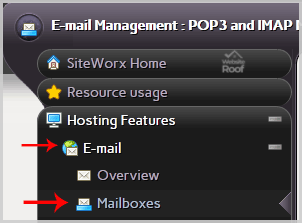
2. Under “SiteWorx Menu“, click the “Hosting Features” menu item if it is not already open.
3. Click the “E-mail” menu item and then click on the “Mailboxes” option.
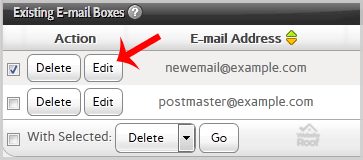
4. Under the “Existing E-mail Boxes” tab, select the appropriate e-mail address and click on the “edit” button.
5. Enter your new password in the password field or use a password generator.
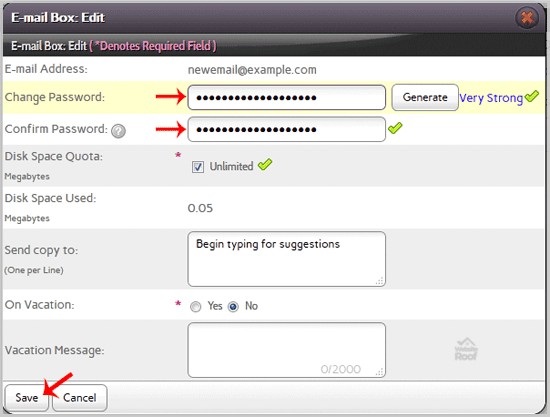
6. Click the “Save” button.
You should see a success message.
Table of Contents
